Bought EdgeUplink eSIMs direct from iMatrix, through a distributor, or pre-installed in iMatrix hardware? Activation is the same either way. Enter the EID, choose a coverage plan, pay by card — and the SIM is live. No account needed first: we email you the link to finish setting one up, and from then on iMatrix Cloud shows usage, per-zone data, carrier status, plan changes, and billing.
Almost every EdgeUplink eSIM activates the same way, with no account needed first. Using a Nordic nRF9160 DK? Those kits have their own activation → /partners/nordic/. Pick the one you're holding.
There is no distributor-specific portal and no separate activation code to chase down. Whichever channel your eSIMs came through, they are activated the same way and managed in one place: iMatrix Cloud. All you need is the EID printed on the eSIM — or on your device label — an email address and a card. No account needed first.
Already manage SIMs in iMatrix Cloud? Sign in → SIM Management.
Activation is self-serve — no sales call, no provisioning ticket, no account to create first. The only choice to make before a device can talk is which coverage plan the SIM should be on.
The EID is the 32-digit number identifying the eUICC chip, printed on the eSIM card (the ICCID printed beside it works too). If the eSIM is a soldered MFF2 inside an iMatrix device, the EID is on the device label. Type it in along with the email address the account should be under — no account is needed first.
Pick the coverage plan and monthly allowance for this SIM, matched to where the device will actually operate. Each plan carries its coverage tier, and plan prices are shown right there. Nothing is charged yet.
Pay by card, processed securely by Stripe. The subscription starts as soon as the SIM is activated.
The SIM is active, and an email arrives with the link to finish setting up your iMatrix Cloud account. One login then covers your eSIMs and any iMatrix hardware on the same account — usage and carrier status appear in SIM Management.
Activating hundreds of eSIMs at once? Bulk activation and zero-touch provisioning come with the Pooled and Enterprise plan families — talk to us and we'll set the account up for you.
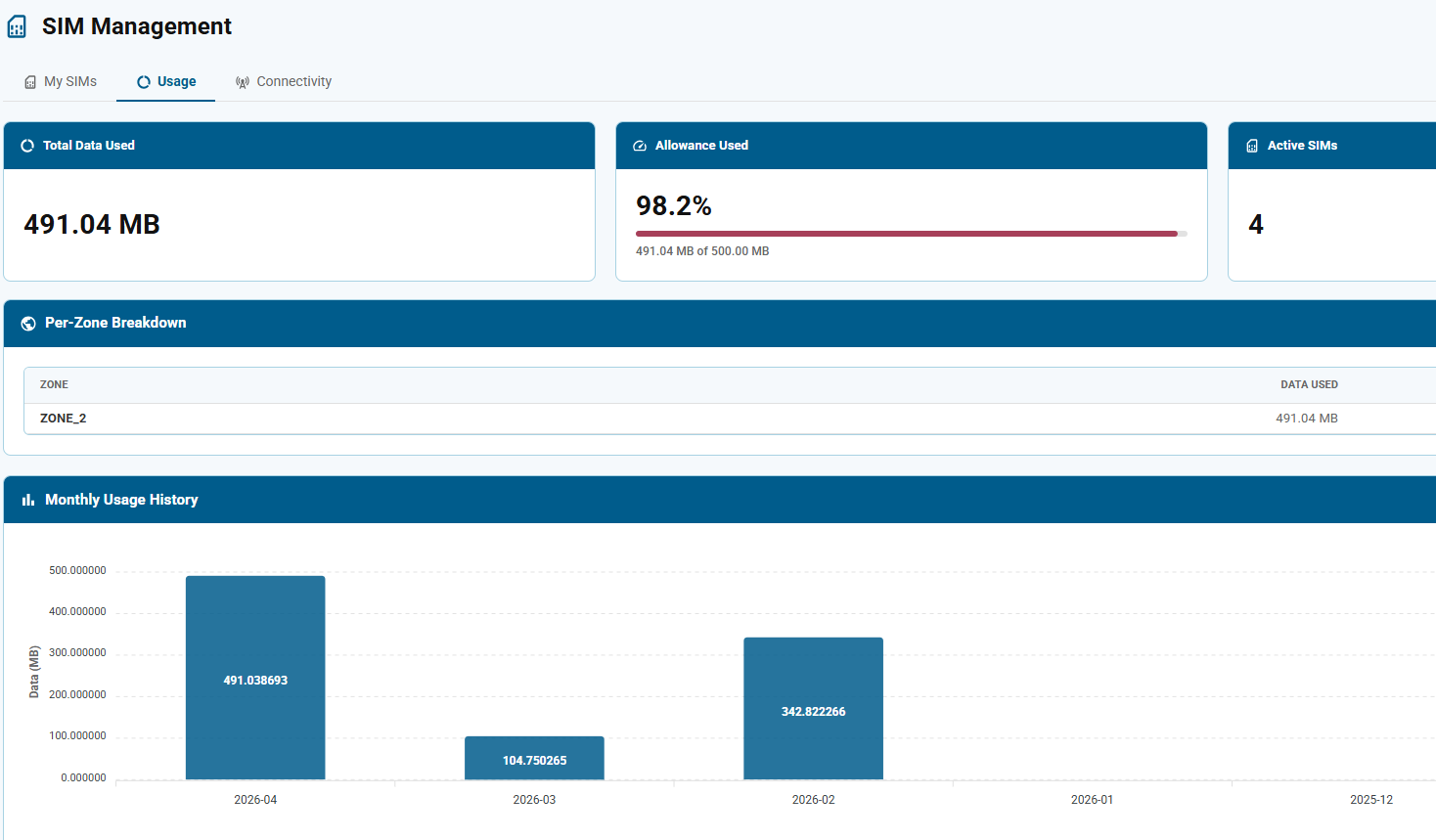
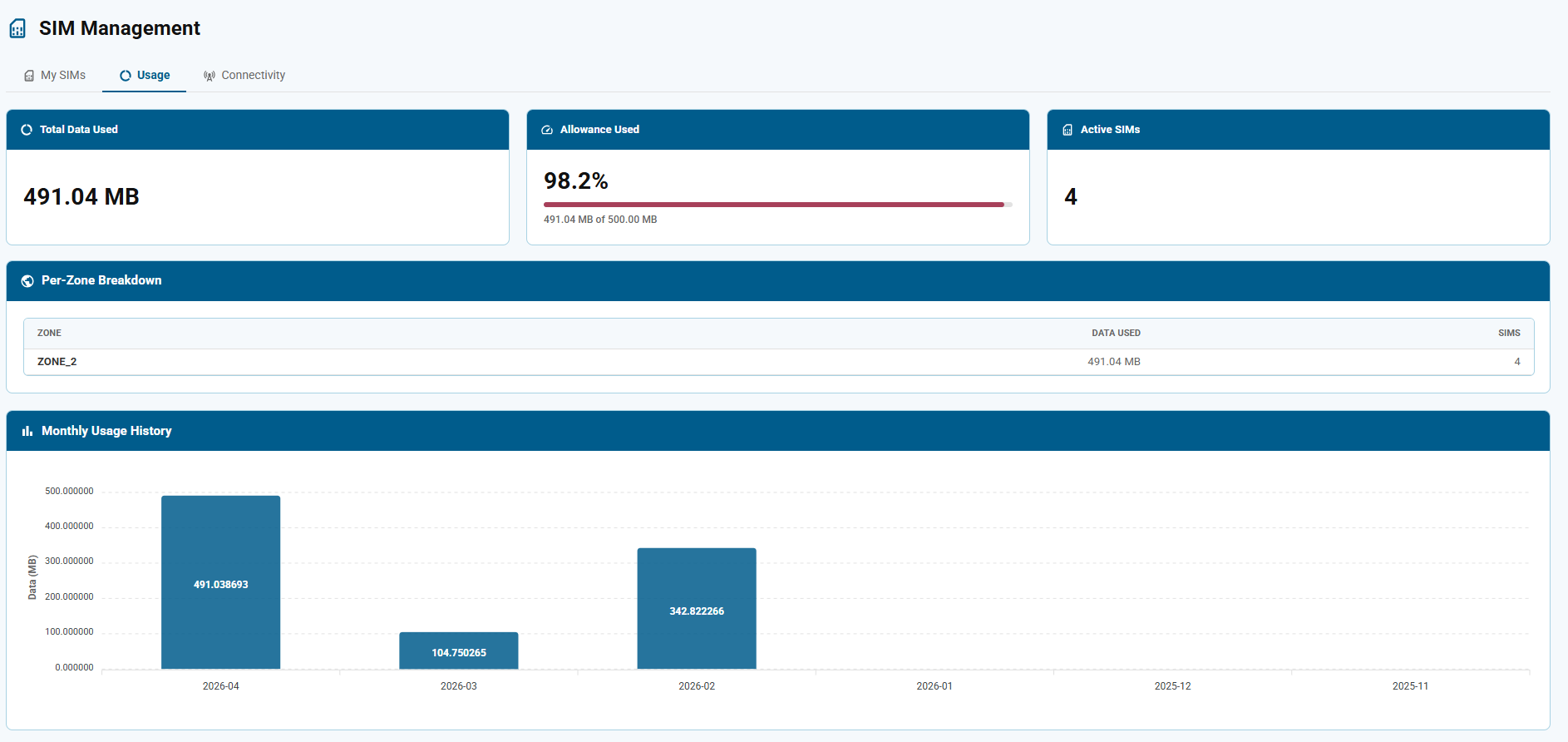
Once an eSIM is activated it shows up in SIM Management in iMatrix Cloud. Three tabs cover day-to-day eSIM management: My SIMs for inventory and status, Usage for what each SIM and each zone is consuming, and Connectivity for the carrier every SIM is attached to right now.

The reason activation is this simple is the same reason everything after it is: the eSIM is a standards-based eUICC, so the operator profile and the commercial plan are both software. Nothing about a change to either requires touching a deployed device.
A plan change meant a support ticket, a contract amendment and a wait. Order the wrong region at purchase time and you had the wrong SIM in the field for the length of the term.
Moving a device to another region — or onto a different rate card — meant physically replacing the SIM. One truck roll per unit, or a returned device, for a change that was purely commercial.
Move a SIM to a different coverage plan yourself, from SIM Management. The operator profile re-provisions over the air per GSMA SGP.22 — no SIM swap and no truck roll.
Equipment parked for the season, a device in a warehouse, a unit out for repair — suspend the SIM and stop the recurring charge. Resume it the day the device ships. No paperwork either way.
No. EdgeUplink eSIMs are activated in iMatrix Cloud regardless of where they were purchased — direct from iMatrix, through a distributor or reseller, or pre-installed in iMatrix hardware. There is no distributor-specific portal, no reseller activation code, and no difference in the plans or coverage you can choose. Activate it with the EID — no account needed first.
The EID is the 32-digit identifier of the eUICC chip itself. On a removable eSIM it is printed on the plastic card the SIM punches out of, next to a barcode. On a soldered MFF2 eSIM there is nothing readable on the chip, so the EID is printed on the device label — and if the device came from iMatrix, the eSIM is already associated with that device in the console.
You may also come across an ICCID. That is a different number, and the distinction matters: the EID identifies the chip, while the ICCID identifies the operator profile currently loaded onto it. Activation accepts either number; once the SIM is active, SIM Management lists it by ICCID.
No. EdgeUplink eSIMs work in any cellular device with a compatible modem — your own product, a development kit, or third-party hardware. The iMatrix Cloud account is used for eSIM management; it does not require you to run iMatrix devices. See the developer documentation for modem and form-factor details.
Yes. The coverage plan — and the coverage tier it carries — is changed from SIM Management in the console, and the change is applied over the air — the device stays where it is and keeps the same eSIM. This is the practical difference between a programmable eUICC and a conventional SIM: a commercial change never becomes a hardware change. Coverage tiers are defined on the coverage page.
The Usage tab shows total MB consumed, the percentage of the monthly allowance already used, a per-zone breakdown, and a month-by-month history chart. Because usage is visible against the allowance rather than only after the fact, you can see an overage building before it lands on an invoice — and move the SIM to a larger plan if it makes sense. Plan prices are shown when you choose a plan at activation.
Yes. A SIM can be suspended and resumed from the console, which is the normal way to handle inventory that has been purchased but not yet deployed, seasonal equipment, and devices out for repair. Suspending takes the SIM off the network; resuming brings it back without a new activation.
There is no cap. The Standard plan family has no minimum and no commitment, so one eSIM and ten thousand eSIMs are both fine. Above roughly 250 deployed eSIMs a Pooled plan usually costs less, because the fleet shares one data bucket instead of paying per SIM; Enterprise adds private APN, static IP and custom rate cards from 500. All three families use the same console and the same coverage. See plans.
Activation is self-serve and takes about five minutes: enter the EID, choose a coverage plan, pay by card — and the SIM is live. No account needed first. Then watch usage and carrier status land in the console.